
This page is a work in progress and is subject to change at any time.
Whether you are a solo warfighter dropping into a ranked ladder or a franchise captain managing a full roster, the Global Warfighter League (GWL) is built to give you total control over your competitive record. Our infrastructure was engineered from the ground up to prioritize transparent matchmaking, precise stat tracking, and the permanent preservation of your competitive history.
GWL Ladders
Q: Where and how do I deploy/enlist to a competition ladder?
The center hub for anyone’s GWL Esports related pages and navigation is their own profile. Once you’ve created an account at Global Warfighter League, your profile will have an “Esports” tab with a number of sub-tabs that navigate to all esports related functions.
Each type of competition (ladder, tournament, league, etc.) has it’s own procedure for joining. Each will be listed below as they become available to join.
For Open Public Competition ladders (anyone can join): From your profile, you can click on the “Esports” tab and then the “Join” sub-tab which lists all publicly listed competitions, including ladders, that you may be eligible to join (also available from the enlist page). Going to that competition’s public page will have a “Join” button if it’s an open public competition. Clicking the “Join” button will automatically add you to the ladder with the standard Elo score (Currently 1200).
Private competitions can be “Request to Join” or “Invitation Only”.
‘Private: Request to Join’ is exactly what it says. While the competition page and rankings are public, it is a private competition. However, anyone can request to join. This does mean that access to compete on the ladder needs to be approved by the competition’s “Command Staff” (Admin and Co-admin). Once approved, competitors will show as joined on the ladder and if the ladder is not already running, can start challenging when the ladder is officially started.
‘Private: Invitation Only’ is also self explanatory. While the competition page and rankings are public, only invited Warfighters can join the competition to compete. Invited Warfighters will receive a private message in their profile inbox from the ladder Command Staff (Admin and Co-admins) inviting them to join. The Warfighter can decline or confirm to join. If they confirm, they’ll be brought to the ladder through the link provided in the message and they can confirm from the ladder’s public page.
Q: What are challenges on a ladder?
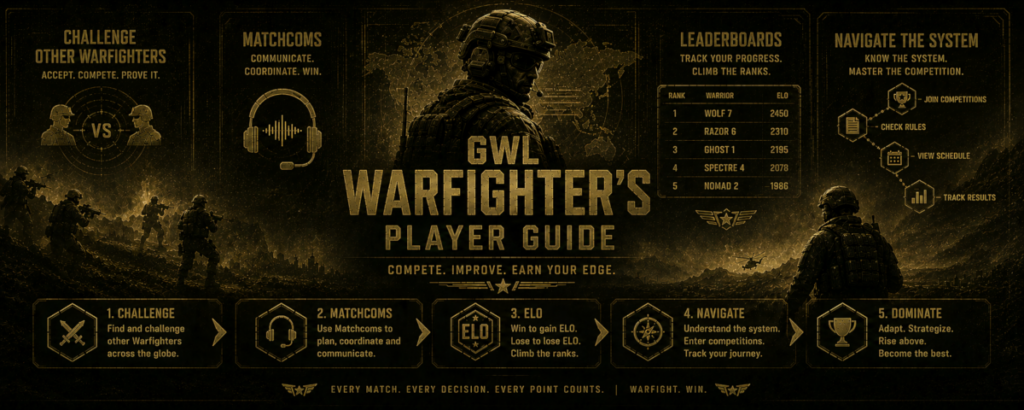
Once a competition ladder has been started by the command staff of a competition, all players on the ladder will be able to ‘challenge’ other players. Initially, the ladder ranking is by order of joining. Rank 1 will be the first person to join while the last rank will be the last person who joined. Each participant starts with 1200 Elo. As matches are played and reported, Elo is adjusted accordingly. If a player joins a ladder after it has started (ladders are an ongoing competition), then the new player also starts as 1200 Elo, and ranks are adjusted for the new player.
There is an accelerated K variable of 64 for the first 5 matches for every player that joins the ladder. A person can be considered settled in their rank after 5 matches of play where the K variable returns to 32. More on how Elo is calculated and used by our league can be found on the Elo Information Page.
Once you’ve enlisted into a competition ladder, you should then be listed within the rankings on the public competition page for that ladder. There will be a challenge button next to every eligible player that can be challenged.
Clicking the ‘Challenge’ button on an opponent’s line launches the challenge modal that asks you to confirm the challenge and if there’s maps entered by the ladder admin you can also choose the map for the match (subject to negotiation). Once you’ve confirmed the challenge the opponent is sent a notification that will show in their profile ‘Esports’ tab and in turn their ‘Action Center and Alerts’ section of the competition ladder.
Yes. Once a challenge has been confirmed by both participants in a ladder match, then the match is waiting to be reported. However, if during matchoms the participants can’t come into agreement on something then either player can request to cancel the match. Canceling a challenge/match does require the other party to confirm.
However, if a player requests cancelation and there’s no response within 48 hours, the challenge is auto-canceled for no response. A response may be a communication in matchcoms like ‘I don’t want to cancel the match.’, but it’s still a response and the 48 hour ‘(Dead Man) timer’ is canceled. At this point one person or the other may request a referee to settle the issue.
Clicking the ‘Auto-match’ button will start an Auto-match matchmaking process for the player who clicked it. When clicked, the user will be prompted for 3 influences on the auto-matching. Precision, Rapid, and Bounty influencing are how the auto-match works with descending cascades from the most precise match to eventually a random opponent if no target is found within all three of the influence criteria.
‘Precision Matchmaking’ is ±50 Elo range. ‘Rapid Matchmaking’ is ±200 Elo range. ‘Bounty Matchmaking’ is a search for opponents that are the most active on the ladder that may or may not be within previous Elo search criteria. If no match is found within these 3 influences, the opponent match will be a random match. More on the specifics of the matchmaking process can be found on the Elo Information page.
When you first step onto the ladder, the matchmaking system needs to figure out your true skill level as quickly as possible. To do this, your first five matches act as a ‘Calibration Phase’. During this time, the system applies an accelerated multiplier (K=64) to your score. This means your early wins and losses will cause massive, rapid jumps in your rank. This setup is designed to quickly push highly skilled veterans to the top of the leaderboards where they belong, keeping early matches fair and preventing top-tier competitors from getting stuck playing against rookies.
Once you complete your fifth match, the system has a solid read on your baseline skill, and the multiplier automatically shifts into standard gear (K=32). Moving forward, your rating changes become much smoother and more gradual. This ‘Stabilization Phase’ protects your hard-earned rank from plummeting just because you had one rough game. From that point on, climbing the ladder relies on steady, consistent performance rather than wild point swings.
More on the specifics of the K Variable can be found on the Elo Information page.
If the creator (ladder admin) has set a default map for all challenges, then that’s the map that will show for the challenge unless otherwise chosen by the challenger. If there are multiple maps entered for a competition, then the challenger has map choice at time of challenge. The map is always negotiable within matchcoms but if there’s no agreement then the originally chosen map is the map for the challenge. If no map was chosen when the opponent was challenged then the competition default map (as set by the ladder admin) is the map for the match.
Not all games will have maps to be chosen. Some games will just require that both participants join the server or game. The map that is selected by the challenger (or the default map) will be shown to the challenged player before accepting or declining a challenge. However, as mentioned, even if the challenged player accepts the challenge, the map is negotiable in matchcoms and if neither player can come to an agreement, then the match can also be canceled without penalty to either player.
Q: What are ‘Matchcoms’?
Matchcoms are all communications for a specific match. This includes communication between players, referees, or command staff (admin and co-admins). Matchcoms also act as a log for the match. If the map changes, if a referee is requested, if cancelation is requested, or if a referee or command staff takes action in a match. Users can also upload screenshots within the matchcoms modal that will show as thumbnails that can be clicked for full size.
Matchcoms have a top section that is an accordion feature named “Player Information” that drops down when clicked. The accordion shows each player’s preferred hours for gameplay and if a competition requires an identifier (In Game Name, Steam ID, GUID and UUID), it’s also listed here.
Matchcoms are part of the match infrastructure and can be accessed in a couple places. If you’ve been challenged or are actively in a competition, simply going to the public page for the competition will show your ‘Matchcoms’ button in the ‘Action Center and Alerts’ as one of the first things on the page. Then, where your match is listed, there will be a ‘Matchcoms’ button there as well.
Clicking this ‘Matchcoms’ button will bring up the matchcoms modal where you and your opponent can negotiate match details including time, server, map etc. Matchcoms are only accessible by you, your opponent and a referee or ladder admin if requested.
Reporting a match is part of the match infrastructure and can be accessed in a couple places. If you’ve been challenged or are actively in a competition, simply going to the public page for the competition will show your “Report Score” button in the “Action and Alert Center” as one of the first things on the page. Then, where your match is listed, there will be a “Report Score” button there as well.
If the loser of a match reports the match then the match modal processes the match immediately. If the winner of the match reports the match then there needs to be confirmation from the other player. However, if the other person doesn’t confirm or respond with a dispute for the match within 48 hours, the match will auto-process. The ladder admin can set this timeline if they don’t want the 48 hr default.
How you prove you’ve won a match is completely up to the admin of the competition. The settings for a competition allow for the honor system, screenshots, video, or both screenshots and video.
The honor system is self explanatory. Matchcoms allow for uploads of screenshots and they’re stored in the matchcoms as a thumbnail and can be clicked for full size by either player, the referee, or the command staff (ladder admin and co-admins). Video url links will be posted as text within matchcoms.
To further this explanation, if ‘Screenshots’ are required evidence, then having a screenshot showing the match ending score screen is what you need. If ‘Video’ is what’s required, then having a video of the match is what’s needed to prove you won.
Whether you actually need the screenshots or the video is totally up to the ladder admin (creator) and will likely be in the ‘Rules of Engagement’. The setting for evidence required should be seen as more of a ‘in the event of a dispute’ kind of directive. Players should be able to just report wins and losses without providing evidence unless otherwise specified in the ‘Rules of Engagement’.
It’s important to note here that players can claim a dispute at any time. Players don’t need screenshots, or video to claim a dispute unless specified in the ‘Rules of Engagement’. However, if screenshots and video are indicated as ‘Required Evidence’ then either side having these IS considered a more powerful argument for a win of the match or in the event of a dispute. Player’s should always be allowed to present their side of the argument. Things happen like the screenshot wasn’t working, video stopped or the match indicated the ‘Honor System’.
Match disputes can be initiated by either player at any time during a challenge or match in progress. The button to start the process is within the matchcoms modal in the top right header bar as ‘Dispute Match’. Clicking the button will acknowledge that a dispute has been filed and the user generating the dispute should put all details of the dispute within the matchcoms chat. A referee or command staff should respond promptly as it will show on their admin view of the ladder.
Disputes are ususually when one player believes the other player hasn’t followed the rules of the competition somehow. The player initiating the dispute should detail their issue in chat and the opponent is able to see the dispute and can respond. Either player can upload screenshots within chat and the responding referee and command staff should sort out the issues and resolve the dispute.
Players may file a dispute at any time. Unless the Rules of Engagement specifically require evidence, screenshots or video are not necessary to submit a dispute. When evidence is listed as required, screenshots and video may strengthen a player’s claim, but all parties should still be given the opportunity to present their side, especially when technical issues, recording failures, or ‘Honor System’ reporting are involved.
GWL Tournaments
Under Development
GWL Leagues
Under Development
GWL Events
Under Development