A shot can look perfect on screen and still miss by centimeters in the simulation. A shoulder can appear to clip a doorway while the character passes through cleanly, or a grenade can strike the visible edge of a railing and bounce from a surface the player barely perceived. These moments are often blamed on “bad hitboxes,” but the geometry behind collision registration is doing far more work than that phrase suggests.
In a modern multiplayer game, the visible model is only one version of the world. Underneath it sits a second model built from invisible collision shapes, trace rules, physics bodies, animation data, and network history. Competitive consistency depends on how closely those systems agree, especially when characters are moving quickly, projectiles are crossing several meters between simulation updates, and two clients are seeing slightly different moments in time.
A Hitbox Is Usually a Collection of Shapes
The word “hitbox” survives because it is simple, but many hitboxes are not boxes at all. Real-time engines commonly represent collision with spheres, capsules, boxes, convex hulls, or combinations of those shapes, while more detailed triangle meshes are reserved for cases where finer surface matching is worth the added cost. Unreal Engine, for example, separates simple collision built from primitives and convex hulls from complex collision based on a mesh’s triangles, while Unity likewise distinguishes efficient primitive colliders from more expensive mesh-based collision.
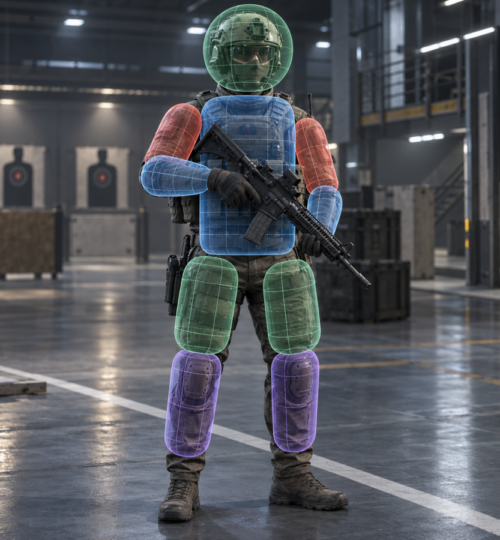
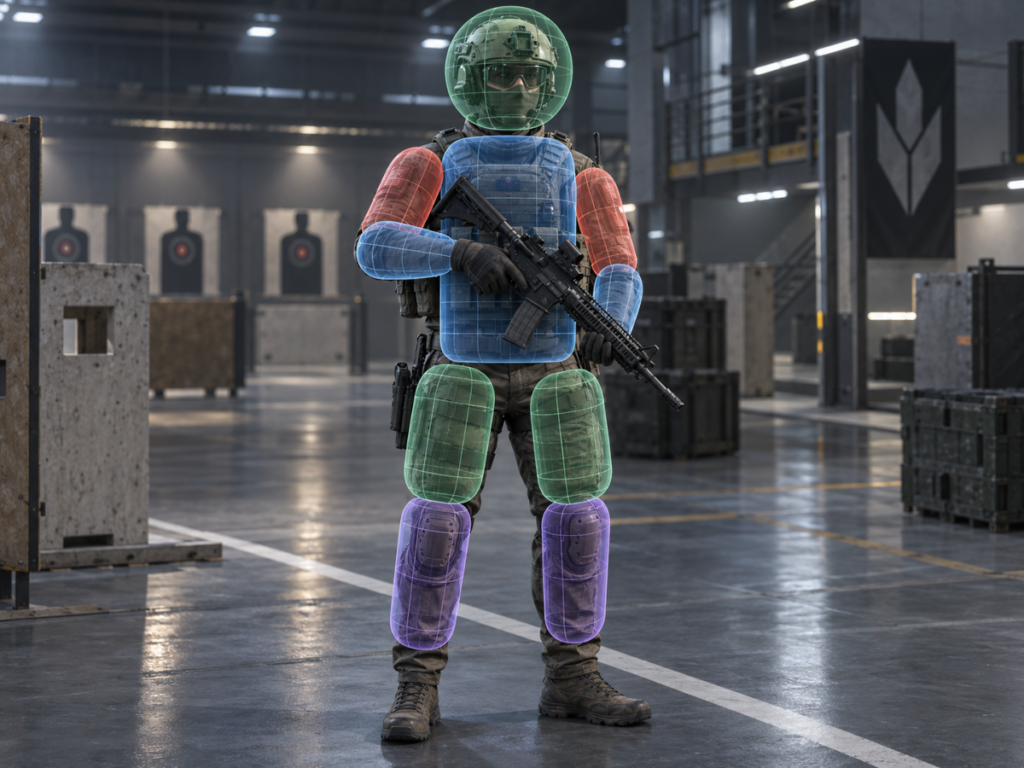
Characters make the idea more interesting because a humanoid shape does not reduce cleanly to one volume. A competitive shooter may use separate bodies around the head, chest, pelvis, upper arms, forearms, thighs, and lower legs, with each shape following a bone or related transform in the animation skeleton. Unreal’s current Physics Asset system reflects this approach directly, attaching collision bodies and constraints to skeletal meshes so those bodies can follow animated characters and also support physical simulation.
That separation gives designers control over gameplay. A head region can produce a different damage result from a torso region, while a larger movement capsule can stop the same character from squeezing through a gap that the rendered elbows or weapon appear able to clear. The damage model, movement model, melee model, and ragdoll model can therefore use related geometry without being forced to use exactly the same collision representation.
The Rendered Model and the Collision Model Have Different Jobs
Polygon-perfect collision sounds ideal until the actual workload is considered. A character model may contain tens of thousands of triangles, deform those triangles every animation frame, carry equipment that changes the silhouette, and appear alongside many other moving actors. Testing every possible gameplay interaction against every visible triangle would spend processing time on detail that often makes no meaningful difference to the competitive result.
Simplified collision also gives developers a way to make contact more stable. A smooth capsule around a character’s lower body behaves better against stairs, corners, ramps, and door frames than a pair of fully modeled boots with individual soles, laces, and ankle geometry. The same logic applies to props and level objects, where a table might need a few convex shapes for physical interaction even though its rendered model contains bevels, screws, and decorative cuts.
The difficult part is deciding how much simplification players will tolerate. If a collision volume extends too far beyond a visible shoulder, shots can appear to hit empty air. If it hugs the model too tightly, animation can open tiny gaps between body regions or make certain poses harder to hit than others. The best geometry usually follows the readable mass of the character rather than every fold of clothing or every frame of animation.
Hitscan Weapons and Projectiles Ask Different Geometry Questions
Many firearms are implemented with traces rather than a physical bullet object traveling through every point in space. A line trace starts at one position, extends to another, and reports the collision geometry it intersects; modern Unreal tooling also supports box, capsule, and sphere traces when a volume is more appropriate than an infinitely thin line. Epic’s documentation specifically describes traces as a low-cost method for tasks that include high-velocity weapon simulation.
A simulated projectile has a different problem. It has position, velocity, often gravity, sometimes drag or guidance, and usually some collision radius of its own. If the projectile is a rocket, grenade, arrow, plasma bolt, or thrown object, the engine may need to sweep that projectile’s shape through the distance it traveled during the current update instead of checking only where it started and where it ended as disconnected points.
This matters because fast objects can tunnel through thin geometry. If a projectile moves from one side of a wall to the other between discrete physics steps, a simple position check can miss the wall entirely. Continuous collision detection and sub-stepping are common answers: Unity documents continuous modes intended to catch fast bodies that would otherwise pass through colliders, while Unreal provides continuous collision options and projectile sub-stepping that breaks movement into smaller simulation slices for better trajectory accuracy.
More accuracy costs more CPU time, so developers rarely apply the heaviest collision method to everything. A fast rocket crossing a competitive arena may deserve continuous checks, while a slowly rolling can on the floor can often remain on cheaper discrete collision. The engineering challenge is to spend precision where a missed contact would change the match.
Collision Detection Starts by Eliminating Most Possible Collisions
A multiplayer map can contain characters, weapons, doors, debris, physics props, projectiles, triggers, vehicles, and large amounts of static environment geometry. Checking every object against every other object would waste enormous amounts of work, so physics systems first reduce the candidate set. Broad-phase systems identify pairs that might be close enough to matter, then narrower tests decide whether the actual shapes intersect.
Modern engines also filter interactions by categories. Unreal exposes collision channels and object responses that can block, overlap, or ignore other classes of objects, while Unity’s layer collision system can skip entire groups of unnecessary checks and reduce both broad-phase and narrow-phase work.
Those rules are part of game design as much as optimization. A projectile might collide with world geometry and enemy bodies, ignore the shooter for a short period after spawning, overlap a trigger volume, and pass through a cosmetic particle effect. A shield may block bullets but allow teammates to walk through it. The geometry only defines where contact can happen; response rules define what that contact means.
Animation Turns Static Shapes Into Moving Targets
Character collision becomes harder once animation begins changing poses. A standing soldier is easy to approximate, but sprinting, crouching, leaning, vaulting, sliding, climbing, falling, reloading, and aiming all move limbs through very different positions. If body volumes are tied to skeletal bones, the collision model must update with those bones without producing gaps, strange overlaps, or damage regions that drift away from the visible body.
Competitive animation can expose problems that casual testing misses. A lean animation might move the rendered head farther than its collision body, a crouch transition might briefly compress two torso regions into each other, or a reload pose might swing an arm outside the volume developers expected to represent the body. High-level players repeatedly force characters into edge cases because movement optimization naturally searches for the smallest exposed target and the safest possible angle.
Equipment makes the problem harder. Helmets, backpacks, shoulder pads, coats, and weapon models can alter a silhouette without necessarily being valid damage surfaces. A designer must decide whether a bullet clipping a decorative antenna counts, whether a bulky backpack represents the body beneath it, and whether a large cosmetic skin can create a competitive disadvantage. Those choices are geometric balance decisions, even when players discuss them as skin fairness or hit-registration quality.
Physical Collision and Damage Collision Often Need Separate Answers
The collision shape that keeps a character from walking through a wall is usually designed for stable movement, not anatomical damage. A broad capsule is excellent for locomotion because it slides smoothly around corners and keeps foot placement manageable, but that same capsule would make shoulder-height gunfire far too generous if it were the only damage target. Separate damage bodies can follow the upper torso and limbs while the movement controller continues using a simpler volume.
Environmental geometry has the same split. A staircase may use a smooth ramp-like collision surface for movement while bullets trace against more detailed geometry, or a decorative railing may use simplified physical collision while still needing a convincing projectile response. Unreal explicitly supports choosing simple or complex collision for different query types, which is one reason a mesh can behave differently when a player walks across it than when a trace tests its surface.
Melee attacks add another layer because the attacking object itself may need volume. A sword swing can be modeled as a swept capsule, box, or weapon-shaped series of traces across several animation frames. The quality of the result depends on both sides of the interaction: the attacking volume must represent the swing, while the defender’s collision bodies must represent where a valid strike can land.
Networking Means the Server May Judge a Different Moment Than the Player Sees
Even excellent local geometry cannot make multiplayer collision perfectly match the image on every client. The server owns its own simulation state, while each player sees a delayed and often interpolated representation of remote players. By the time a firing command reaches the server, the target may already have moved from the location where the shooter saw and aimed at it.
Server-side lag compensation addresses that mismatch by evaluating a shot against an earlier state of the target. Valve’s Source networking documentation describes the server restoring a target’s previous hitbox position based on the estimated command time, tracing the shot against that historical state, and then returning to the current simulation. The same documentation also explains why this can produce familiar multiplayer moments such as taking damage after reaching cover, because the shooter’s valid shot was evaluated against an earlier position where the target was still exposed.
That means “the hitbox was wrong” can describe several different failures. The local collision body may genuinely be poorly aligned, the projectile sweep may have missed between simulation steps, the animation state may disagree with the damage bodies, or the server may have correctly evaluated historical geometry that no longer matches what the target sees. Debugging hit registration requires separating geometry errors from timing errors.
Competitive Hitboxes Are a Balance Between Fidelity and Reliability
The most accurate-looking collision model is not always the best competitive model. A perfectly fitted set of tiny body shapes can make hit detection sensitive to animation detail, frame timing, bone motion, and network differences that players cannot reasonably read. Slightly cleaner, more stable volumes can produce a fairer result because the target remains consistent across equivalent poses.
The same principle applies to map geometry. Competitive players learn the exact width of door frames, the angle of cover, the height of head-glitch positions, and the path a grenade can take through small openings. If invisible collision protrudes from a wall or leaves a gap where the art appears solid, that mismatch becomes part of the meta until it is fixed. Players will find it because repeated competition turns tiny geometric errors into repeatable tactics.
Engine tools increasingly expose this hidden world directly to developers. Physics assets can be previewed around skeletal meshes, traces can be drawn for debugging, collision channels can be isolated, and physics simulations can be inspected across frames or sub-steps. Epic’s current Chaos tooling, for example, includes a visual debugger that can record physics state and inspect a simulation at specific frames and sub-steps, which is exactly the level of visibility needed for problems that exist for only a fraction of a second.
A good hitbox therefore comes from repeated testing rather than a single modeling pass. Developers need to test every movement state, major animation, weapon class, projectile speed, frame-rate condition, and network condition that can expose a mismatch. The geometry has to remain understandable under pressure, because competitive players judge collision by whether identical actions keep producing identical results.
The invisible shapes around a player model may be simple capsules and convex bodies, but their placement decides whether a headshot feels earned, whether a rocket catches a doorway, whether a sword connects during a sidestep, and whether cover can be trusted. In a competitive match, a few centimeters of hidden geometry can carry as much gameplay weight as the weapon stats printed in the patch notes, which is why collision work remains one of the least visible and most demanding parts of building reliable multiplayer combat.