
Disclaimer: The views and opinions expressed in this article are solely those of the author. The mention of any products, services, or methods does not constitute an endorsement.
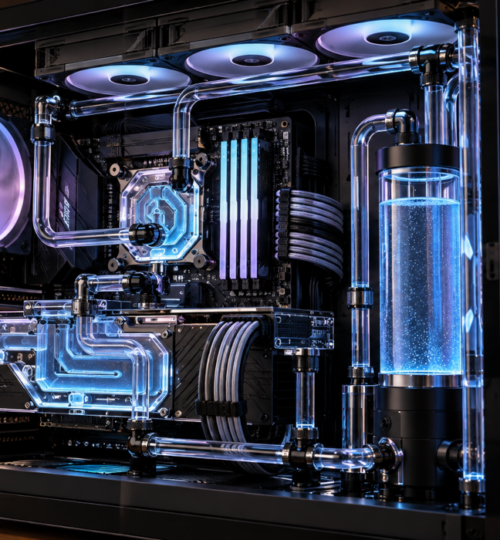
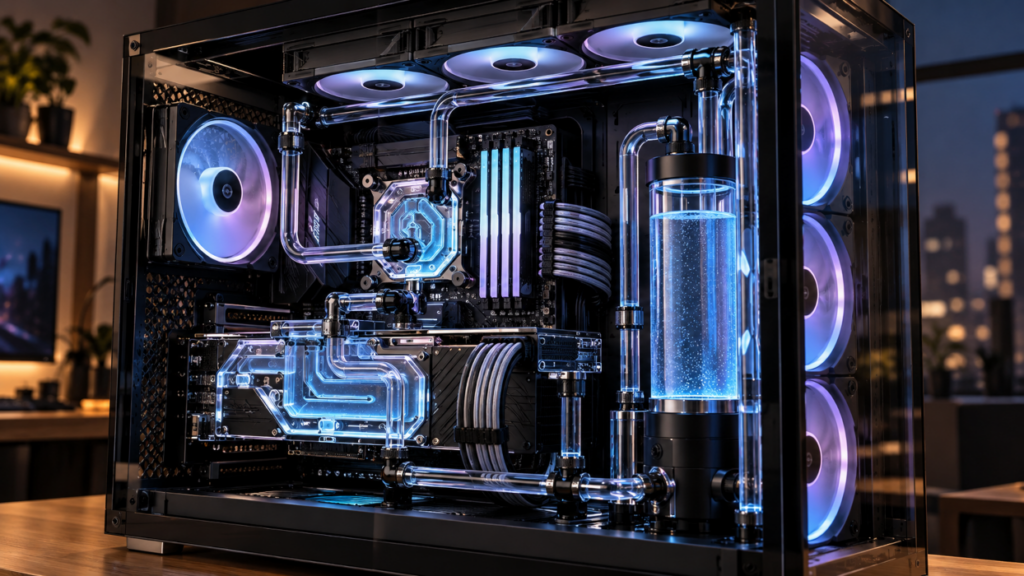
A custom water-cooled gaming PC can be recognized immediately: a reservoir mounted beside the motherboard, carefully routed tubing, and radiators hidden behind rows of fans. The result can look extraordinary, but the practical question is whether the cooling system makes a modern PC perform any better. With powerful factory GPU coolers, capable all-in-one liquid coolers, and processors that adjust their own boost clocks, the performance argument for building a custom loop has become more demanding.
There are still good reasons to move a CPU or graphics card onto a custom liquid circuit. The strongest involve sustained high-power workloads, quieter operation, and the flexibility to move heat to larger radiators. The gains in frame rates, however, are often much smaller than the gains shown on a temperature monitor.
How Custom Water Cooling Earned Its Place
Custom water cooling emerged as a practical response to the limitations of earlier enthusiast hardware. Increasing processor frequency and voltage raised heat output, and moving that heat into a liquid circuit made it possible to use larger radiators away from the processor socket. For an overclocker pushing a system beyond ordinary settings, improved heat removal could make a previously unstable configuration usable.
Building a loop demanded considerable work. Enthusiasts selected pumps, reservoirs, water blocks, radiators, tubing, and fittings separately, then assembled and tested the complete circuit. As manufacturers began offering purpose-built components, the process became more approachable. Full-cover GPU blocks, distribution plates, standardized fittings, and transparent cases also made the cooling hardware a central part of the machine’s appearance.
That history explains the unusual place custom loops occupy in 2026. They remain functional cooling systems, yet builders also value the layout, materials, and fabrication work. A useful assessment has to separate the thermal benefits from the visual and technical satisfaction of constructing one.
Modern CPU Boost Algorithms Limit the Rewards
Contemporary processors constantly adjust operating frequencies according to temperature, power, current, and workload. They already extract much of the available performance without a fixed manual overclock. Lowering temperatures can create additional boost headroom, but only when temperature is the constraint preventing higher performance.
AMD’s Ryzen 7 9850X3D specifications illustrate the current approach. Launched in January 2026, the processor has an advertised maximum boost of 5.6 GHz, a default TDP of 120 watts, and a maximum operating temperature of 95°C. AMD supports Precision Boost Overdrive and Curve Optimizer, and recommends liquid cooling for optimal performance. That recommendation establishes neither a need for a custom loop nor a guarantee of faster gaming with one.
Intel’s Core Ultra 7 270K Plus specifications provide another example. Introduced in the first quarter of 2026, it lists a 125-watt processor base power and 250-watt maximum turbo power. A sustained, heavily threaded workload can challenge an inadequate cooler, especially when motherboard power settings allow extended high-power operation. Those power figures describe different operating conditions, however, and do not mean the processor consumes 250 watts in every game.
A further limitation exists inside the processor package. Heat travels from small silicon dies through internal materials and the integrated heat spreader before reaching the water block. Even a large radiator cannot remove that internal thermal resistance. A CPU can consequently report high temperatures while the coolant itself remains relatively cool, leaving expensive additional radiator capacity with little performance to contribute.
The GPU Is Still the Strongest Thermal Argument
High-end graphics cards can produce far more heat than many gaming CPUs, and their factory coolers must dispose of it within the space available around the PCIe slot. NVIDIA lists 575 watts of total graphics power for its reference RTX 5090, although consumption varies with workload and partner-card specifications. A full-cover water block transfers heat from the graphics processor and other designated components into coolant that can be routed through large radiators elsewhere in the case.
A February 2026 KitGuru comparison of four RTX 5090 water blocks shows how large the thermal improvement can be. Testing an Asus ROG Astral card, the reviewers recorded GPU core temperatures around the mid-50s Celsius above ambient with its factory cooler, compared with the mid-20s above ambient using custom blocks. The temperature difference between the best and worst water blocks was only about 3°C.
The extra cooling increased automatic GPU clock speeds by approximately 50 MHz and improved the synthetic 3DMark Speed Way score. Those results support the case for better thermal headroom, but they do not establish an equivalent increase in frame rates across games. The test also used two 420 mm radiators dedicated to GPU cooling on an open bench. A conventional case with less radiator area should not be expected to reproduce the same temperatures.
This distinction matters when shopping for premium blocks. Once a water block transfers heat effectively, additional spending on elaborate machining or appearance may produce very little measurable advantage. Radiator capacity, airflow, and the operating limits of the graphics card can matter more than a small difference between blocks.
Cooler Hardware Does Not Guarantee More Frames
The relationship between clock speed and gaming performance is rarely linear. A GPU can reach its electrical power limit while operating well below its thermal limit, making additional cooling of little help unless other settings change. Some games are also limited by the CPU, particularly when players lower visual settings to chase extremely high frame rates.
In a March 2025 PC Gamer review of the air-cooled MSI RTX 5090 Suprim SOC, the factory-overclocked card ran roughly 200 MHz faster in an observed workload than the Founders Edition. Average 4K frame rates were nevertheless less than 5% higher in the reviewer’s tests, and a further manual overclock yielded about another 2%. This was not a custom-loop comparison, but it illustrates why additional frequency often produces modest real-world returns.
For competitive players, the relevant test is whether the existing system loses performance because of heat. If CPU and GPU clocks remain stable through long matches, replacing adequate cooling with a custom loop may have little effect on average or minimum frame rates. A machine experiencing thermal throttling, by contrast, has a problem that better cooling can directly address. Measuring temperatures, clock behavior, power draw, and frame-time consistency before buying parts is far more informative than comparing idle temperatures.
Noise Reduction May Matter More Than Overclocking
A large custom loop can spread heat across radiator surface area that would never fit directly onto a graphics card. With sufficient airflow, larger radiators allow fans to run more slowly while holding coolant temperatures within a chosen range. That can reduce the sharp fan noise associated with a powerful factory GPU cooler during sustained gaming.
The benefit depends on the complete system. Pumps generate vibration and motor noise, radiators restrict airflow, and poorly chosen fans can remain audible even at moderate speeds. A small loop with insufficient radiator capacity may be louder than a carefully configured air-cooled PC. Builders also have to account for the heat entering the case and the room, neither of which disappears because it passes through water first.
Coolant-temperature control is particularly useful for fan tuning. Water warms and cools more gradually than a CPU die, so radiator fans can respond to the accumulated thermal load rather than every short boost spike. The result can be steadier acoustic behavior, provided the loop has suitable sensors and fan-control support.
Where Custom Loops Stand Against AIO Coolers
A modern 280 mm or 360 mm all-in-one liquid cooler offers substantial CPU cooling without requiring a separate pump, reservoir, fittings, or a fill procedure. Larger AIOs are also available for cases that support them. For many gaming processors, this is enough cooling to maintain normal boost behavior, making a CPU-only custom loop difficult to justify on performance alone.
A custom circuit becomes more distinctive when it includes a graphics card or an unusual case layout. Builders can choose radiator locations, connect multiple blocks, monitor coolant conditions, and replace individual components. These options help with compact builds, high-power machines, and systems designed around particular noise limits. They also introduce more opportunities for installation errors and considerably more work during a component swap.
Manual overclocking remains a legitimate use, especially for extended benchmark runs or sustained rendering. Yet voltage increases can cause power and heat to climb disproportionately, and the silicon itself may refuse higher frequencies regardless of coolant temperature. Conventional radiator loops also depend on ambient air for heat rejection; they cannot provide the below-ambient operation of chilled or extreme cooling systems without separate equipment.
The Cost Is Hard to Recover Through Performance
A custom loop needs a pump, reservoir, radiator or radiators, appropriate fans, fittings, tubing, coolant, and blocks for each cooled component. GPU blocks are an especially significant expense. In its February 2026 comparison, KitGuru listed several RTX 5090 blocks at approximately £200 to £300, while the Thermal Grizzly DeltaMate was priced at €499.90. Those prices covered individual blocks, not an assembled loop.
A combined CPU and GPU circuit can cost hundreds of dollars and can exceed $1,000 with premium parts and extensive radiator capacity. The actual total depends on what the builder already owns, how many blocks are included, and whether appearance-oriented components are selected. Costs also continue after assembly through replacement fluid, maintenance supplies, and potentially new GPU blocks during upgrades.
For a player trying to improve competitive performance, this creates a clear opportunity cost. The same budget could contribute toward a faster graphics card, CPU, memory configuration, or display. Owners who already have the hardware they want may reasonably spend on lower noise, thermal margin, and the experience of building the system, but the purchase should not be treated as a cost-effective way to gain frames.
Maintenance, Compatibility, and Reliability
A custom loop requires more care than a sealed AIO or an air cooler. Fittings must be secured, the circuit checked for leaks, and trapped air removed after filling. Corsair’s Hydro X XH505i installation guidance calls for at least 24 hours of leak testing and warns that damage caused by improper assembly is not covered by its warranty. That recommendation belongs to the specified Corsair kit rather than serving as a universal manufacturer requirement.
Coolant and component choices affect long-term reliability. Mixing aluminum and copper in a shared loop without a system specifically engineered to manage the combination can encourage galvanic corrosion. Coolant chemistry, tubing permeability, accumulated deposits, and the use of opaque fluids can also affect maintenance needs. Service intervals should follow the relevant manufacturers’ instructions and the actual condition of the system rather than a single schedule applied to every build.
Upgrading the GPU brings further complications. Full-cover blocks are commonly designed for particular circuit-board layouts, so moving to a different card can require a new block and partial loop reconstruction. Removing factory cooling hardware may also affect warranty claims, depending on the manufacturer, applicable law, and whether the modification caused damage. The labor involved in draining and refilling a system deserves as much attention as the initial installation.
Engineering Project, Display Build, or Both?
Rigid acrylic or PETG tubing can turn the interior of a PC into a carefully composed assembly. Achieving clean bends and accurate fitting alignment takes measurement, practice, and patience. Distribution plates and illuminated coolant add to the appearance, although their contribution to thermal performance may be minimal. Flexible tubing is often easier to install and service, and can cool equally well when the rest of the loop is comparable.
That craftsmanship is a legitimate reason to build a custom-cooled PC. Enthusiasts have always invested time in case modification, cable routing, and distinctive hardware arrangements without expecting those changes to increase frame rates. A sophisticated loop can be rewarding as a personal engineering project, provided its owner understands the costs and maintenance it entails.
Planning for future upgrades makes that investment more durable. Accessible drain ports, reusable radiator arrangements, and serviceable tubing routes can reduce the work involved in changing hardware. Some CPU blocks can move between processor generations with new mounting hardware; full-cover GPU blocks are much less likely to survive a change in card design. A tightly integrated show build can look excellent on day one and become frustrating when the next graphics card arrives.
For builders who regularly change components, modularity may be the most valuable design feature of all. It allows the pump, reservoir, fans, and radiators to remain in service even as individual blocks are replaced, spreading their cost across multiple builds. That long-term practicality can make a carefully planned custom loop easier to live with than a more elaborate arrangement optimized only for its first photograph.