
Disclaimer: The views and opinions expressed in this article are solely those of the author. The mention of any products, services, or methods does not constitute an endorsement.
In massively multiplayer online games, performance is often measured in small advantages. A faster reaction, a cleaner rotation, or a well-timed ability can mean the difference between victory and defeat. While players often focus on builds, gear, and strategy, one of the most powerful tools available sits right under your hand. The gaming mouse.
Modern gaming mice are not just pointing devices. They are programmable control hubs designed to reduce friction between intention and execution. For MMO players especially, where dozens of abilities, macros, and actions are constantly in play, mastering your mouse can fundamentally change how you experience the game.
The Evolution of Gaming Mice in MMOs
Early MMO players relied heavily on keyboards. Hotbars stretched across number keys, and modifiers like Shift and Ctrl became second nature. Over time, manufacturers recognized that MMO players needed more accessible input options. This led to the rise of multi-button gaming mice with side panels designed specifically for ability-heavy gameplay.
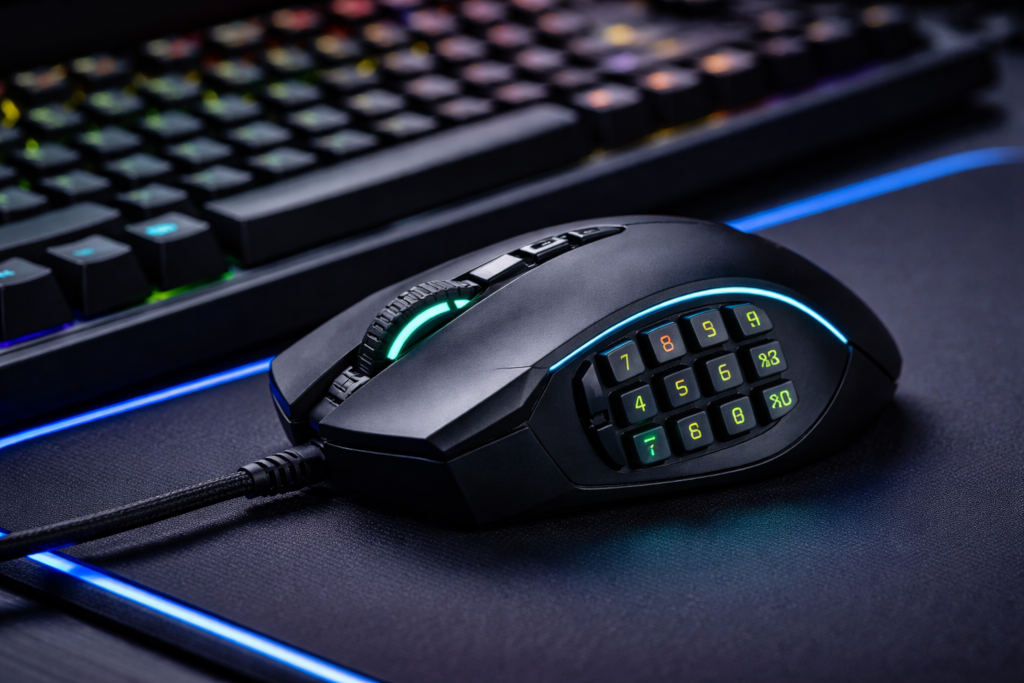
Brands like Razer, Logitech, and Corsair began producing mice with 12 or more thumb-accessible buttons. These devices transformed how players interacted with games like World of Warcraft, Final Fantasy XIV, and Guild Wars 2.
Today, the gaming mouse is not just an accessory. It is a core component of an optimized MMO setup.
Understanding Your Mouse Hardware
Before diving into customization, it is important to understand the hardware you are working with. Most MMO-focused mice share a few key features:
- Side button grid: Typically 6 to 12 buttons positioned for thumb access
- DPI adjustment: Allows you to control cursor sensitivity on the fly
- Onboard memory: Stores profiles directly on the mouse
- Scroll wheel tilt or click options
- Extra top buttons for additional inputs
Each of these elements can be mapped and remapped depending on your needs. The key is to think of your mouse not as a fixed tool but as a customizable extension of your playstyle.
Mapping Abilities to Mouse Buttons
The most common use of a gaming mouse in MMOs is mapping abilities to side buttons. This reduces reliance on keyboard movement and allows your left hand to focus on positioning and movement.
A typical setup might look like this:
- Primary rotation abilities on the first row of thumb buttons
- Cooldowns on the second row
- Utility spells or situational abilities on the third row
This layout keeps frequently used skills within easy reach while separating them logically. The goal is consistency. If your brain associates a certain row with a certain type of ability, your reaction time improves naturally.
It is also important to avoid overcrowding your mouse with too many critical actions. While it is tempting to bind everything, clarity is more valuable than quantity.
Using Modifier Keys for Expanded Control
One of the most powerful techniques is combining mouse buttons with modifier keys such as Shift, Ctrl, or Alt. This effectively multiplies your available inputs.
For example:
- Button 1 = Ability A
- Shift + Button 1 = Ability B
- Ctrl + Button 1 = Ability C
With this approach, a 12-button mouse can theoretically provide dozens of unique inputs.
However, there is a tradeoff. More combinations can increase complexity. The key is to use modifiers for abilities that are less frequently used or that require deliberate activation, such as defensive cooldowns or long timers.
Creating Macros for Efficiency
Macros are where gaming mice truly shine. Most mouse software allows you to create custom macros that execute multiple actions with a single press.
In MMO contexts, macros can be used for:
- Ability sequences
- Target switching
- Mounting or item usage
- Chat commands
For example, a macro might combine a targeting command with an ability, reducing the need for multiple inputs.
It is important to note that many MMOs have strict rules about automation. Games like World of Warcraft allow certain macros but restrict automated sequences that remove player input. Always ensure your macros comply with the game’s terms of service.
Profile Management for Different Games
If you play multiple MMOs or switch between genres, profile management becomes essential. Most gaming mice software allows you to create separate profiles for different games.
For instance:
- MMO profile with full side button usage
- FPS profile with minimal bindings and lower DPI
- General desktop profile for everyday use
Switching profiles automatically when launching a game can streamline your experience and prevent conflicts.
This is particularly useful if you are running a community site that covers multiple games, as you can tailor your setup to each title you are actively engaging with.
DPI and Sensitivity Optimization
DPI settings often get overlooked in MMO discussions, but they play a role in precision and comfort. Higher DPI allows for faster cursor movement with less physical motion. Lower DPI provides more control and precision.
In MMOs, the ideal DPI often falls somewhere in the middle. You want enough speed to navigate menus and camera movement efficiently, but enough control to avoid overshooting targets or UI elements.
Some players prefer dynamic DPI switching, using a higher setting for exploration and a lower one for combat scenarios.
Ergonomics and Long Play Sessions
MMOs are known for long sessions. Raids, events, and grinding sessions can last hours. This makes ergonomics a critical factor.
A well-configured mouse should reduce strain, not add to it. Consider the following:
- Button placement should feel natural and not require awkward thumb stretching
- Grip style should match the mouse shape
- Click resistance should be comfortable over long periods
Overloading your mouse with too many functions can actually increase fatigue if it forces unnatural hand positions.
Practice and Muscle Memory
Customization is only the first step. Mastery comes from repetition.
Once you have your bindings set, commit to them. Avoid constantly changing your layout, as this resets your muscle memory. Spend time practicing in low-pressure environments such as:
- Training dummies
- Early game content
- Solo play sessions
Over time, your hand will begin to move instinctively, reducing the cognitive load during high-pressure situations like competitive matches or raids.
Integrating Mouse Setup with Your Overall Playstyle
Your mouse configuration should complement your overall gameplay strategy.
For example:
- A healer may prioritize quick access to target-specific abilities
- A DPS player may focus on rotation efficiency and cooldown timing
- A tank may emphasize defensive abilities and crowd control
There is no universal setup. The best configuration is the one that aligns with your role, your reflexes, and your comfort.
The Competitive Edge in Modern MMOs
In today’s MMO environment, where many games incorporate competitive elements and ranked systems, small optimizations can have a measurable impact.
Players who fully utilize their hardware often experience:
- Faster reaction times
- Reduced input errors
- Greater consistency in performance
This is especially relevant for communities that thrive on competition, where even minor advantages can influence outcomes.
Common Mistakes to Avoid
Even experienced players can fall into traps when customizing their mouse:
- Overbinding too many abilities and losing clarity
- Ignoring ergonomics in favor of maximum functionality
- Frequently changing layouts and disrupting muscle memory
- Using macros that violate game rules
The goal is not to use every feature, but to use the right features effectively.
Final Thoughts: Turning Hardware Into Skill
A gaming mouse is not a shortcut to skill, but it is a tool that can unlock your potential. When configured thoughtfully, it reduces friction between decision and action, allowing you to focus on strategy and execution.
For a revived gaming community, this topic is more than just a technical guide. It represents a mindset. The idea that improvement comes from understanding your tools, refining your setup, and committing to mastery.
As MMO landscapes continue to evolve, players who take the time to optimize their hardware will always have an edge. Not because the mouse plays the game for them, but because it allows them to play at their best.
And in competitive gaming, playing at your best is what it is all about.